 الإنجليزية
 صمم موقعك الأن!
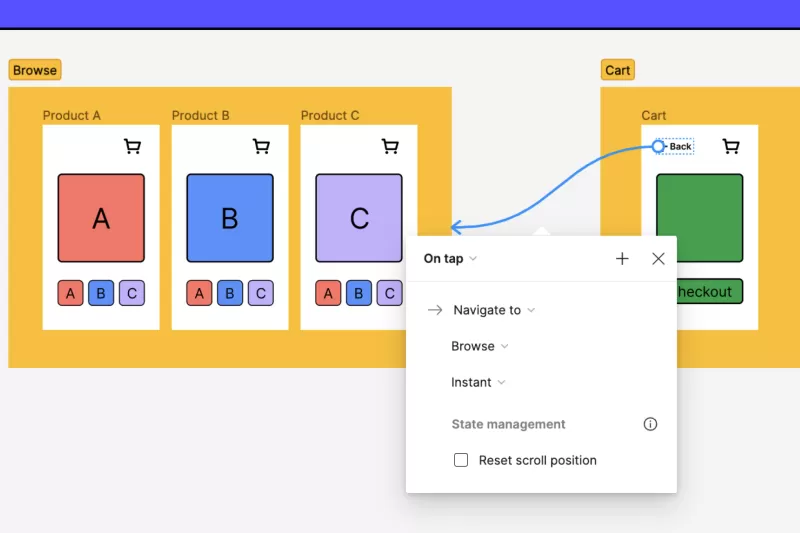
To prototype in Figma, design your frames, switch to the Prototype tab, connect elements to destination frames with interactions such as On click or While hovering, choose animations like Smart Animate, then preview and share a link for feedback. Variables, conditional logic and interactive components let you build realistic flows without code. Below are the basics and advanced techniques.
In the fast-paced world of design, prototyping plays a crucial role in bringing ideas to life and ensuring that designs meet user needs before moving into development. Figma has emerged as a powerful tool for prototyping, offering a collaborative platform where designers can create interactive prototypes seamlessly. In this extensive guide, we will explore how to prototype in Figma in detail, covering everything from the basics to advanced techniques. Whether you are a beginner or an experienced designer, this guide will help you leverage Figma’s prototyping capabilities to enhance your design workflow.
Prototyping is the process of creating a preliminary version of a product to test and validate design concepts. In the context of UI/UX design, a prototype is an interactive model of a website or application that simulates user interactions. Prototypes help designers and stakeholders visualize the end product, identify usability issues, and gather feedback before moving forward with development.
Figma stands out as a top choice for prototyping due to its user-friendly interface and robust features. Here are some reasons why Figma is a preferred tool for prototyping:
Planning a new website or improving your current one? We can review your needs and suggest the right approach. Book a free consultation on WhatsApp
To get started with prototyping in Figma, follow these steps:
Begin by creating a new file in Figma or opening an existing design file that you want to prototype. Ensure that your design is well-organized with clear layers and components.
Before diving into prototyping, ensure that you have all the necessary screens designed. This includes all the key pages and interactions you want to showcase in your prototype. Use Figma’s design tools to create your layouts, add UI elements, and ensure consistency across screens.
To create an interactive prototype, you need to define the interactions between different screens. Figma’s prototyping features allow you to set up links, transitions, and animations. Follow these steps to add interactive elements:
Designing a prototype involves setting up navigation flows to simulate user journeys. Figma allows you to create multiple links and interactions between screens, enabling you to map out various user paths. Use Figma’s interactive components to set up these flows:
Once you’ve set up your interactions and navigation flows, it’s time to preview and test your prototype. Figma provides a preview mode where you can interact with your design as if it were a live application. To access the preview mode:
Sharing your prototype with stakeholders and gathering feedback is a crucial step in the design process. Figma makes it easy to share prototypes with others and collect valuable input:
Based on the feedback you receive, make necessary refinements to your prototype. Figma’s real-time collaboration features enable you to make changes and update your prototype quickly. Iteration is key to creating a successful design, so be prepared to revisit and adjust your prototype as needed.
For more complex prototypes, Figma offers several advanced techniques and features:
How to prototype in Figma involves a systematic approach to designing interactive and engaging prototypes. By leveraging Figma’s powerful prototyping features, you can create realistic simulations of your designs, gather valuable feedback, and refine your ideas before moving into development. Whether you’re working on a simple app or a complex web application, Figma’s collaborative and versatile platform provides the tools you need to bring your designs to life.
If you’re looking for a partner to help with your web design needs and bring your digital vision to reality, Sympaweb is the ideal choice. With a team of skilled designers and developers, Sympaweb offers top-notch web design services that can help you create exceptional user experiences and achieve your business goals.
Figma has a free plan with prototyping features; paid plans add more projects, team libraries and advanced features.
An animation option that smoothly transitions matching layers between frames, making prototypes feel like real apps.
Yes. Use the Figma mobile app or open the shared prototype link on your phone.
At Sympaweb we design and develop fast, SEO-ready business websites and online stores for clients in Jordan, the Gulf and beyond.
Last updated: November 2026